

| NFS Share | SMB Share | S3 | EFS |
|---|---|---|---|
| DataSync Targets | S3 | EFS | FSx for Windows |
DataSync Sources
- Up to 100 tasks can be started simultaneously per account within a region
- The per-task limit for transferred files is set to a maximum of 50 million files
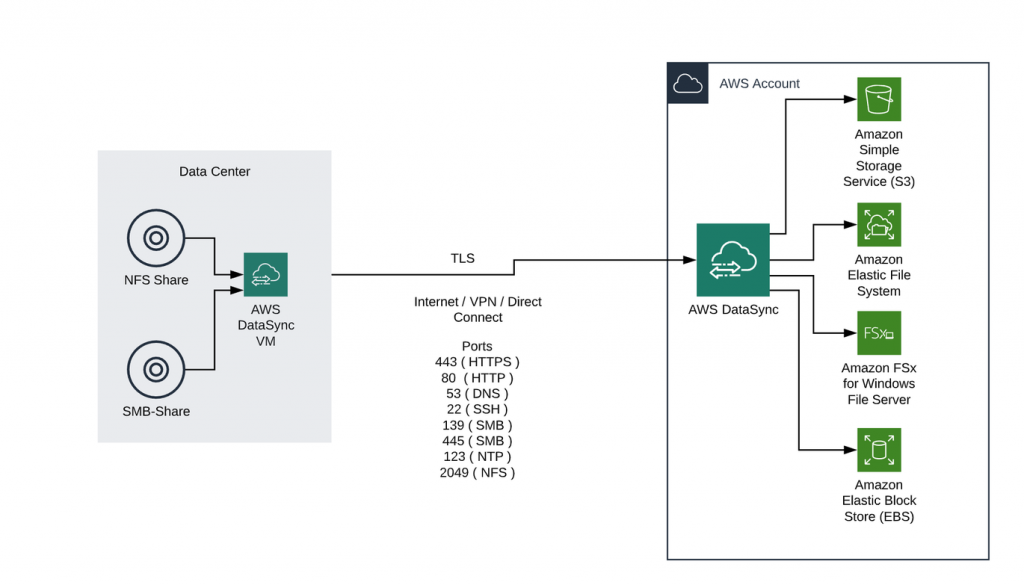
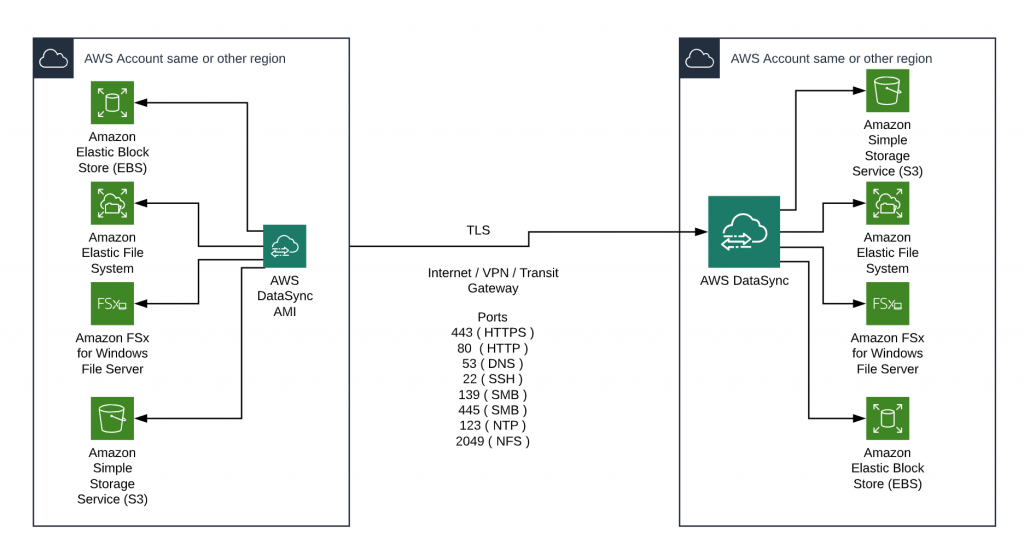
- AWS DataSync is activated either by downloading and starting a VM in the physical data center or by using an Amazon Machine Image (AMI) in the AWS environment.
- In both cases, we speak of the AWS DataSync Agent. The following hypervisor environments are supported:
- VMware ESXi Hypervisor version 6.0 or 6.5 or 6.7
- AWS EC2 Hypervisor
The following section presents two scenarios in which AWS DataSync can successfully deployed:
1 Migrating file server data from an on-premise data center to AWS
2 Data migration within an AWS Region or migration to another AWS Region
Implementation within a customer project
Initial situation
- 4 TB data (PDF and Word files) on SMB fileshare in the Data Center
- Classic Windows Server application layer
- Application needs mount volumes for data access
- Application reads 99% of data in Object Mode
- Migration of the data must be completed within 4 weeks
- Newly generated and modified data in the source directory must be available after Go Live
Implementation and target scenario
- Use of AWS DataSync
- Use of multiple tasks simultaneously for initial and incremental migration to S3 Buckets
- 3rd party solution “CloudBerry” for native mounting of the respective S3 buckets for the Windows applications
- On average 1000 read accesses per minute per Windows node
Benefits of the solution
- Creation of a highly redundant central storage solution
- Reduction of the operational effort as no SMB file server solution and/or FSx for Windows is used
- Reduction of the current operating costs, billing according to the storage space used